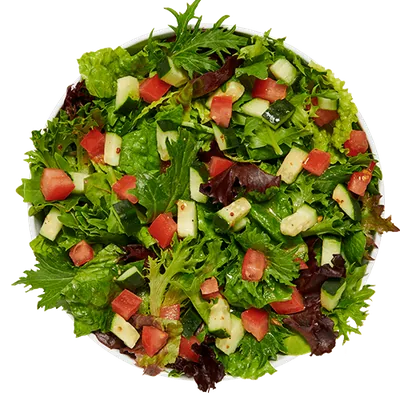
MOD Pizza salad calories vary by recipe and by the exact serving label published for that recipe. Italian Chop and Greek use Mini, MOD, and Mega in the captured nutrition table. Garden and Caesar use Mini/Side for the smaller row, then MOD and Mega. Dressing components have their own per-tablespoon rows, which should not be confused with a complete finished salad row.
This guide uses MOD Pizza official nutrition information captured on 2026-07-14. It preserves complete nutrition rows and calls out one incomplete dressing entry rather than representing missing fields as zero. The values are dated menu-planning references, not medical advice, allergen-safety conclusions, or guarantees about current preparation and portions.
MOD Pizza salad calories by exact size
| Item | Serving | Calories | Fat | Sodium | Carbs | Protein |
|---|---|---|---|---|---|---|
| Italian Chop | Mini | 355 | 25 g | 640 mg | 16 g | 10 g |
| Italian Chop | MOD | 470 | 36 g | 1130 mg | 23 g | 20 g |
| Italian Chop | Mega | 1100 | 71 g | 2260 mg | 46 g | 39 g |
| Greek | Mini | 290 | 21 g | 470 mg | 18 g | 6 g |
| Greek | MOD | 410 | 27 g | 790 mg | 30 g | 11 g |
| Greek | Mega | 810 | 54 g | 1590 mg | 59 g | 22 g |
| Garden | Mini/Side | 140 | 11 g | 200 mg | 11 g | 1 g |
| Garden | MOD | 170 | 12 g | 210 mg | 14 g | 2 g |
| Garden | Mega | 310 | 23 g | 410 mg | 27 g | 4 g |
| Caesar | Mini/Side | 390 | 30 g | 900 mg | 15 g | 17 g |
| Caesar | MOD | 660 | 52 g | 1530 mg | 28 g | 26 g |
| Caesar | Mega | 1350 | 105 g | 3120 mg | 60 g | 52 g |
The table contains 12 complete captured salad rows. Each row includes calories, fat, sodium, carbohydrates, and protein; the full MOD Pizza nutrition reference also shows calories from fat, saturated fat, trans fat, cholesterol, fiber, and sugars.
Keep the size label attached to every value. A Garden Mini/Side is listed at 140 calories, Garden MOD at 170, and Garden Mega at 310. Greek is listed at 290 for Mini, 410 for MOD, and 810 for Mega. Those are exact source rows, not values generated by multiplying one serving.
How the four captured salad recipes compare
Garden salad rows
Garden has the smallest calorie values among the four captured salad recipes at each comparable larger label: 170 calories for MOD and 310 for Mega. Its Mini/Side row is 140. The same rows list 210 and 410 milligrams of sodium for MOD and Mega, with 2 and 4 grams of protein.
Greek salad rows
Greek is listed at 290 calories for Mini, 410 for MOD, and 810 for Mega. Its sodium values are 470, 790, and 1,590 milligrams. The serving label changes with the complete row, so use Mini when Mini is the intended comparison and do not substitute the Garden Mini/Side label as if it were identical.
Italian Chop salad rows
Italian Chop is listed at 355 calories for Mini, 470 for MOD, and 1,100 for Mega. Protein rises from 10 grams in the captured Mini row to 20 for MOD and 39 for Mega, while sodium rises from 640 to 1,130 and 2,260 milligrams. Reading several fields prevents the comparison from becoming only a calorie ranking.
Caesar salad rows
Caesar is listed at 390 calories for Mini/Side, 660 for MOD, and 1,350 for Mega. The corresponding protein values are 17, 26, and 52 grams, and the sodium values are 900, 1,530, and 3,120 milligrams. These are complete captured recipe rows. They should not be reconstructed by taking a greens row and adding a dressing row unless the source explicitly defines that model.
MOD Pizza dressing calories per captured tablespoon
| Item | Serving | Calories | Fat | Sodium | Carbs | Protein |
|---|---|---|---|---|---|---|
| balsamic vinaigrette | Per 1 tbsp | 60 | 6 g | 115 mg | 1 g | 0 g |
| caesar | Per 1 tbsp | 100 | 10 g | 180 mg | 1 g | 1 g |
| extra virgin olive oil | Per 1 tbsp | 120 | 14 g | 0 mg | 0 g | 0 g |
| oil and vinegar | Per 1 tbsp | 60 | 7 g | 0 mg | 0 g | 0 g |
| ranch | Per 1 tbsp | 50 | 6 g | 75 mg | 1 g | 0 g |
| red wine vinegar | Per 1 tbsp | 0 | 0 g | 0 mg | 0 g | 0 g |
The six complete dressing rows use “Per 1 tbsp” as the captured serving label. Red wine vinegar is listed at 0 calories, ranch at 50, balsamic vinaigrette and oil and vinegar at 60, Caesar at 100, and extra virgin olive oil at 120. Their fat and sodium values differ even when two dressings share the same calorie number.
For example, balsamic vinaigrette and oil and vinegar are each listed at 60 calories, but the captured fat values are 6 and 7 grams and the sodium values are 115 and 0 milligrams. Extra virgin olive oil is listed at 14 grams of fat and 0 milligrams of sodium. These comparisons describe one published tablespoon, not the amount applied to a restaurant salad.
Why Champagne Vinaigrette is not in the complete table
Champagne Vinaigrette is exposed as 67 cal in the captured page reader, but the remaining ten nutrition fields are not available for the same entry. It is therefore excluded from the complete-row table rather than displaying unknown fat, sodium, carbohydrates, or protein as zero.
A calorie-only entry can still be useful as a narrow menu reference. It cannot support the same complete comparison as the six dressing rows above. This site keeps the incomplete record visible as a limitation and refuses to pad the missing fields.
Are dressings already included in the complete salad rows?
Treat the complete salad row as the published finished row for its exact name and size. Treat the Salad Dressing category as a separate set of component references. The captured data does not justify automatically adding one tablespoon of dressing to every complete salad row or automatically subtracting it. Doing so could double-count a component or invent a portion.
If the order includes a separately measured dressing serving and you are intentionally modeling that addition, keep it as a separate line in your notes. Verify whether the current restaurant recipe already includes the dressing and how much is served. The site’s calculator uses the complete salad variants shown in its product cards; it does not invent a custom dressing adjustment.
How add-ons can change a salad comparison
Cheese, meat, vegetables, sauces, and other components have their own captured rows in the Nutrition page. Adding a published component value to a salad can illustrate a hypothetical serving, but it does not establish the exact amount a restaurant uses. Extra, light, on-the-side, and substitution requests can change the portion and preparation.
The MOD Pizza toppings calorie guide explains the serving labels for crusts, cheese, meat, vegetables, sauces, and finishes. Use those component rows for research, not as a promise that an arbitrary sum equals a future prepared salad.
How to compare salads in the calorie calculator
- Open the MOD Pizza Calorie Calculator and search for Garden, Greek, Italian Chop, or Caesar.
- Select the exact Mini, Mini/Side, MOD, or Mega variant shown on the product card.
- Add one portion and confirm that the selected summary repeats the correct name and size.
- Review calories with fat, sodium, carbohydrates, and protein.
- Clear the calculator before building a second size or recipe comparison.
- Add another supported meal item only when it is genuinely part of the order being modeled.
Changing one variable at a time makes the result easier to understand. Compare Garden MOD with Greek MOD to focus on recipe. Compare Greek Mini, MOD, and Mega to focus on size. Avoid comparing Garden Mini/Side with Caesar Mega and describing the gap as a recipe-only difference.
Menu, allergen, and current-source checks
The menu guide provides descriptions and captured menu context. The nutrition table provides complete numeric rows. The allergen reference preserves separate ingredient text, contains markers, equipment markers, and shared-preparation warnings. A calorie or dressing table cannot answer whether an item is safe for an allergy.
Recipes, dressing portions, ingredients, suppliers, preparation, restaurant availability, and nutrition can change after the source date. Verify the current salad and dressing details through official MOD Pizza information and the restaurant when they matter.
A practical salad comparison checklist
- Match the exact salad name and size label.
- Do not merge Mini and Mini/Side into an assumed identical serving.
- Keep complete salad rows separate from per-tablespoon dressing components.
- Do not fill Champagne Vinaigrette’s missing ten fields with zero.
- Read sodium, fat, carbohydrates, and protein with calories.
- Verify current preparation, ingredients, allergens, and portions before relying on the snapshot.
For more exact-row comparisons, browse the MOD Pizza nutrition blog. The most reliable approach is always the same: preserve the item, serving label, source date, and known data limits together.